Every serious builder has a set of tools they trust. A carpenter has specific planes and chisels. A surgeon has instruments she has used enough times to know their particular character. A photographer develops preferences for lenses that reflect how he sees.
Entrepreneurs are no different. Behind every efficient, scalable business is a set of tools that the founder knows deeply — not just what the tools do, but how they interact, where they fall short, and how to get the most from them.
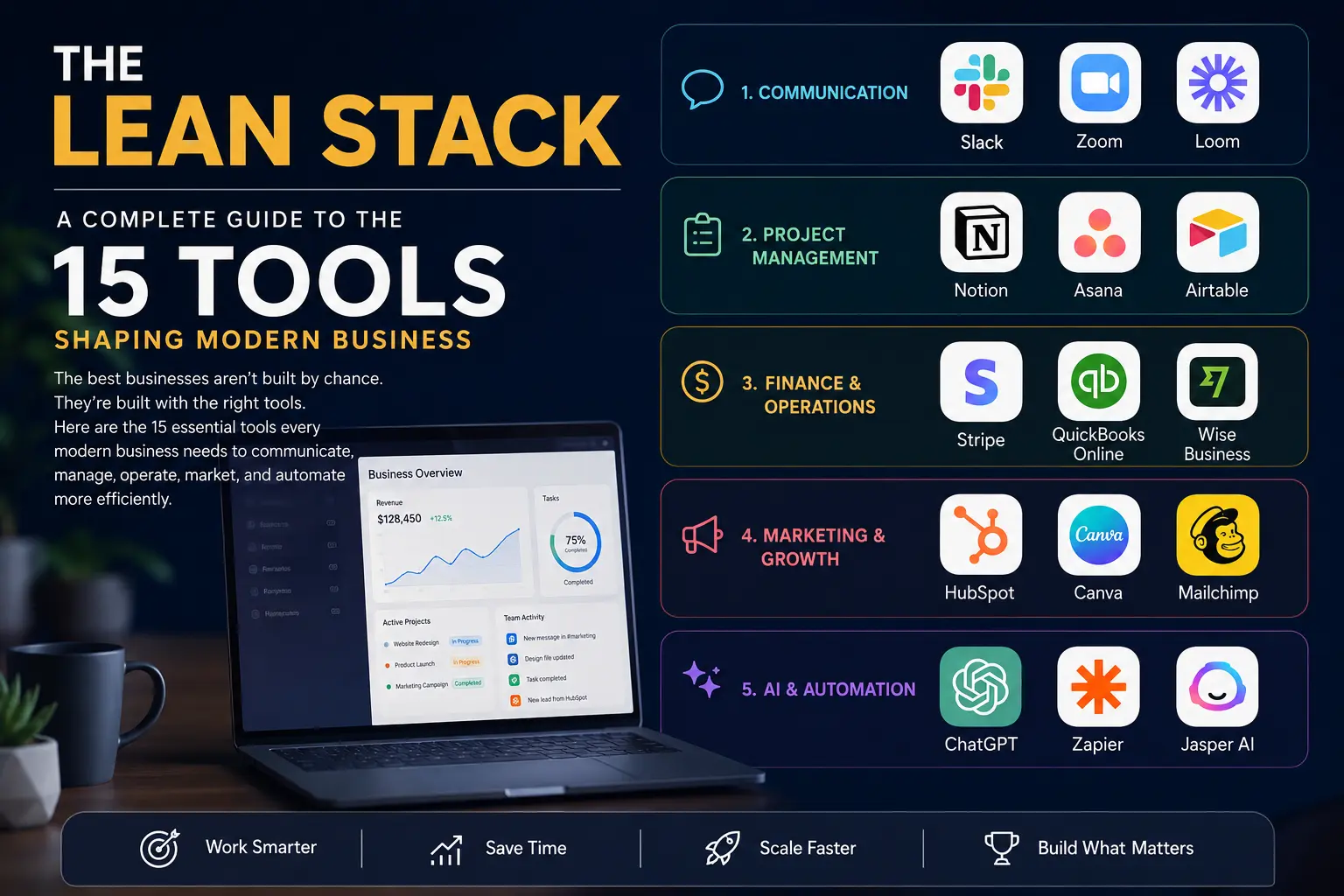
What follows is our assessment of the fifteen tools that belong in that set for most modern businesses. We have organized them across five categories, each representing a fundamental operational need. We have tried to be honest about both strengths and limitations, because the goal is not to impress you with the technology but to help you build something real.
CATEGORY ONE: COMMUNICATION
The way a team communicates determines, more than almost any other factor, how well it performs. Poor communication creates duplicated work, missed deadlines, unclear expectations, and the particular kind of organizational friction that slowly erodes morale and momentum. Good communication tools do not guarantee good communication — that requires people and culture — but they create conditions in which good communication becomes possible and sustainable.
Slack
There is a reason Slack has become the default metaphor for workplace messaging. Before it arrived, most teams managed internal communication through a combination of email threads that became impossible to follow, chat applications that were not built for business, and informal conversations that left no record. Slack solved all of this.
The core concept is straightforward: conversations are organized into channels, which can be structured by team, project, client, or any other logic that makes sense for your business. This means that the discussion about a specific client account lives in one place, the conversation about the new product launch lives in another, and the general team banter has its own space separate from both. Information does not get buried. Context is preserved.
Beyond the channel structure, Slack offers threaded conversations that keep discussions organized without cluttering the main channel view, a powerful search function that makes finding specific information straightforward, and a file-sharing capability that keeps relevant documents attached to their conversational context.
The integration ecosystem is where Slack becomes genuinely powerful. The platform connects with more than two thousand other applications, meaning that notifications, updates, and data from the rest of your stack can flow into Slack automatically. A new sale in Stripe, a completed task in Asana, a form submission in HubSpot — all of these can generate automatic Slack notifications, keeping your team informed without requiring anyone to manually check multiple platforms.
One note of caution: Slack can become a source of distraction and anxiety if not managed deliberately. The temptation to be always available, to respond to every message immediately, to treat Slack as an always-on meeting can undermine the very productivity it is designed to support. The teams that use Slack most effectively are those that have established clear norms around response times, notification settings, and the difference between urgent and non-urgent communication.
Pricing begins with a free tier that is genuinely useful for small teams, though message history is limited. Paid plans start at around twelve dollars per user per month and unlock full history, more integrations, and administrative controls.
Zoom
Video conferencing is not a new concept, but Zoom succeeded where earlier competitors struggled by making it work reliably and consistently. Before Zoom, video calls were exercises in technical frustration — poor connections, complicated setup processes, audio that dropped at critical moments. Zoom made video calling feel like it should have felt all along: simple, stable, and clear.
For distributed teams, the ability to have high-quality face-to-face conversations is not a luxury. Research in organizational psychology consistently shows that visual communication carries information that text cannot — tone, expression, the subtle signals that help human beings understand each other. Teams that rely entirely on text-based communication lose something real. Zoom restores it.
The platform has evolved significantly since its initial rise to prominence. The addition of AI-powered meeting summaries and transcriptions has been particularly valuable for distributed teams working across time zones. A team member who cannot attend a live meeting can access a complete transcript and summary afterward, ensuring that no one is left out of the loop by geography.
Zoom also functions effectively as a webinar platform, which makes it useful for companies that host training sessions, client presentations, or educational events. The same tool that handles your internal team meetings can host a professional event for hundreds of external participants.
The free tier allows meetings of up to forty minutes, which is sufficient for many purposes. Paid plans begin at around fifteen dollars per month and remove the time limit while adding features relevant to larger organizations.
Loom
Of the three communication tools in this section, Loom is the least widely known and arguably the most underappreciated. The premise is simple: instead of writing a long email or scheduling a meeting to explain something complex, you record a short video of yourself and your screen, then share the link.
The applications are broader than they might initially appear. Loom is exceptional for giving feedback on design work, explaining a technical process, walking a client through a proposal, onboarding a new team member to a system, or communicating nuance that would be difficult to capture in text. It is also fundamentally asynchronous — the recipient watches it when they have time, and the sender does not need to coordinate schedules.
What makes Loom particularly useful in a lean business context is the combination of speed and clarity it enables. A two-minute video recorded in real time can replace a thirty-minute meeting. It can also replace a five-paragraph email that still might not convey the information accurately.
The platform has added AI features that automatically generate transcripts and written summaries of each recording, which means the content of your videos is searchable and accessible to people who prefer to read rather than watch.
The free tier is generous for individual users. Paid plans, which start at around twelve dollars per month, add analytics, longer recording limits, and team management features.
CATEGORY TWO: PROJECT MANAGEMENT
If communication tools determine how well people talk to each other, project management tools determine how well they work together. The difference matters. A team can have excellent communication and still fail to execute effectively if there is no clear system for organizing who is responsible for what, by when, and to what standard.
Notion
Notion occupies a unique position in the project management landscape because it is not, strictly speaking, a project management tool. It is better described as a flexible workspace — a platform that can be configured to serve many different functions depending on what a team needs.
At its most basic, Notion is a place to write things down. Notes, documents, plans, ideas — all of these live in Notion pages that can be organized into a hierarchy as simple or as complex as your work requires. But Notion's power comes from its database functionality, which transforms it from a note-taking application into something more like a lightweight business operating system.
In Notion, any collection of information can be treated as a database. A list of clients is a database. A content calendar is a database. A project tracker is a database. Each database can be viewed in multiple formats — as a traditional table, as a kanban board, as a calendar, as a gallery — and filtered, sorted, and grouped according to whatever criteria are most useful at a given moment.
This flexibility means that Notion can replace, or at least significantly reduce reliance on, many other tools. Companies that use Notion effectively often maintain their entire knowledge base — processes, training materials, company policies, meeting notes, strategic planning documents — within a single Notion workspace that any team member can access.
The limitation of Notion is that this flexibility can become a liability if the system is not designed thoughtfully. Because Notion can do so many things, it is easy to build a workspace that is powerful in theory but confusing in practice. The teams that succeed with Notion are those that invest time upfront in designing a clear structure and maintain the discipline to keep it organized.
The free tier is usable for individuals and small teams. Business plans start at around sixteen dollars per user per month.
Asana
Where Notion excels at documentation and knowledge management, Asana excels at execution. It is a purpose-built task and project management platform, and the specificity of its purpose shows in its design.
In Asana, every piece of work is a task. Tasks have owners, due dates, descriptions, attached files, and subtasks. They live within projects, which can be viewed as lists, kanban boards, or timelines depending on what is most useful. Teams can see at a glance what work is in progress, what is coming up, what is overdue, and who is responsible for what.
One of Asana's most valuable features is its rules engine, which allows teams to automate repetitive project management processes. When a task is completed, the system can automatically trigger the next task, notify the relevant team member, move the project to the next stage, or any combination of these actions. This kind of automation removes the coordination overhead that slows teams down — the constant back-and-forth of checking whether something is done before the next thing can start.
For companies managing multiple projects simultaneously, Asana's portfolio view provides executives with a consolidated picture of all ongoing work, making it easy to identify bottlenecks, resource conflicts, and projects at risk before they become problems.
Asana integrates well with most other tools in a lean stack, including Slack, Notion, and the various automation platforms. The free tier is appropriate for individuals and small teams. Premium plans start at around eleven dollars per user per month.
Airtable
Airtable occupies a space between spreadsheet and database that nothing else quite fills. It looks familiar — the default view resembles a spreadsheet — but underneath that familiar surface is a relational database structure that makes it possible to build tools and systems that a conventional spreadsheet simply cannot support.
The practical applications are diverse. Airtable works well as a lightweight CRM, as an editorial calendar, as an inventory management system, as a vendor database, as a product roadmap — essentially, as any system that involves organizing structured information and tracking its status over time.
What distinguishes Airtable from both spreadsheets and traditional databases is the ease with which non-technical users can build meaningful systems. Creating a table, defining its fields, setting up relationships between tables, building views that display specific subsets of information — all of this requires no technical knowledge beyond a willingness to learn the platform's logic.
Airtable's automation capabilities, while not as robust as dedicated platforms like Zapier, allow for meaningful workflow automation within the platform itself. Forms that feed directly into databases, notifications that trigger when records are updated, automated emails that go out when certain conditions are met — these reduce the manual work involved in maintaining and acting on business data.
The free tier supports a limited number of records and features. Paid plans begin at around twenty dollars per user per month.
CATEGORY THREE: FINANCE AND PAYMENTS
For all of the excitement around product, marketing, and growth, the financial infrastructure of a business is where everything ultimately comes to rest. A company that cannot reliably receive payments, track its finances, or move money across borders is a company with serious operational problems regardless of how compelling its product might be.
Stripe
For any business that receives payment online, Stripe is the infrastructure on which that payment processing is built. It has become the default choice not because of aggressive marketing but because of genuine technical quality — the platform is reliable, well-designed, and trusted by businesses ranging from solo freelancers to some of the largest companies in the world.
Setting up Stripe is straightforward. Within a few hours, a business can be accepting credit and debit card payments from customers in virtually any country, in any of over a hundred and thirty currencies. For subscription businesses, Stripe handles the recurring billing logic automatically, including failed payment recovery, subscription upgrades and downgrades, and prorated billing calculations.
The dashboard provides clear, real-time visibility into revenue, including breakdowns by product, geography, payment method, and time period. For founders who want to understand their business financially, this data is invaluable.
Stripe's fraud detection system, which runs automatically on every transaction, uses machine learning to identify and block suspicious activity before it results in chargebacks or losses. For businesses that have experienced fraud, this protection alone justifies the platform's fees.
Pricing is based on a percentage of transactions rather than a monthly subscription. The standard rate is 2.9 percent plus thirty cents per transaction, with lower rates available for high-volume businesses.
QuickBooks Online
Accepting payment is only one part of financial management. Understanding where your money is going, what you owe, what you are owed, and whether your business is actually profitable — these questions require dedicated accounting software.
QuickBooks Online is the established leader in small business accounting for good reason. The platform connects directly to bank accounts and credit cards, automatically importing and categorizing transactions. It handles invoicing, expense tracking, payroll, tax preparation, and financial reporting in a single integrated system.
For founders without accounting backgrounds, QuickBooks provides enough guidance to manage basic bookkeeping independently. For those who work with accountants or bookkeepers, the platform provides the structure and reporting that financial professionals need to do their work efficiently.
The cash flow planning feature deserves particular mention. Many small businesses fail not because they are unprofitable but because they run out of cash at a critical moment — often because they did not see the problem coming. QuickBooks analyzes your historical financial patterns and projects your cash position forward, giving you early warning of potential shortfalls so you can address them before they become crises.
Plans range from thirty dollars per month for basic functionality to over one hundred dollars per month for plans that include advanced features and payroll processing.
Wise Business
The traditional banking system was not designed for global business. International wire transfers are slow, expensive, and opaque. Exchange rates are unfavorable. Receiving payment in foreign currencies is unnecessarily complicated. For businesses that operate across borders — whether that means serving international clients, paying overseas contractors, or operating in multiple countries — these limitations are more than inconveniences. They are real costs.
Wise Business addresses them directly. The platform allows businesses to hold accounts in more than fifty currencies simultaneously, send and receive international payments at rates that are significantly better than those offered by traditional banks, and provide team members with business debit cards that work globally without excessive fees.
The practical implications are significant. A business based in the United Kingdom serving clients in the United States, European Union, and Australia can accept payment from each of those clients as if it were a local business in their respective markets, then hold those funds in the relevant currencies and convert them only when advantageous to do so.
For businesses that pay international contractors, Wise similarly streamlines the process. Payments that would take days through a traditional bank and cost significant fees in both directions can be completed in hours at a fraction of the cost.
The account itself is free to open. Fees apply only on currency conversions and certain types of transfers, and they are consistently lower than comparable costs at traditional financial institutions.
CATEGORY FOUR: MARKETING AND GROWTH
Building a business without customers is an exercise in futility. The marketing tools in a lean stack are those that make it possible for a small team — or even a single founder — to attract, engage, and retain a substantial customer base without the headcount that marketing functions have traditionally required.
HubSpot
HubSpot began as an inbound marketing platform and has evolved into one of the most comprehensive customer relationship management and marketing automation systems available. For lean businesses, its appeal is partly practical: the free tier is genuinely useful, offering a CRM with unlimited contacts and a core set of marketing, sales, and service tools at no cost.
The CRM at HubSpot's center tracks every interaction with every contact and company in your database. Every email sent, every meeting held, every deal stage update — all of it is recorded automatically, giving anyone on the team a complete picture of the relationship at a glance. For sales teams, this eliminates the need to keep mental track of dozens of active conversations. For customer success teams, it ensures that no client falls through the cracks.
The marketing automation capabilities allow businesses to build sophisticated sequences that respond to customer behavior. A visitor who downloads a specific resource can be automatically added to a nurture sequence tailored to their apparent interests. A prospect who opens an email but does not respond can receive a follow-up at a defined interval. These kinds of personalized, automated interactions would require significant staff time to manage manually.
HubSpot's reporting tools translate all of this activity into clear metrics — conversion rates at each stage of the funnel, revenue attributed to specific campaigns, deal velocity, and many others. For founders who need to understand what is working in their marketing and sales efforts, this visibility is important.
The free tier is a reasonable starting point for most businesses. Paid plans scale significantly in price and functionality, making HubSpot one of the more expensive items in a lean stack as the business grows.
Canva
Design used to require designers. The skills involved in creating professional visual content — understanding composition, typography, color theory, and the technical requirements of different media — took years to develop and commanded corresponding salaries. For small businesses, this meant either accepting amateur-looking visual communication or paying significant money for professional design work.
Canva changed this calculus substantially. The platform provides access to hundreds of thousands of professional templates, a straightforward editing interface that requires no design training, and a set of tools that handle many of the most common design needs with minimal effort.
For a lean business, this matters across multiple contexts. Marketing materials, social media graphics, presentation decks, email headers, proposal documents — all of these require visual design, and all of them can be produced in Canva by someone with no formal design background.
The Brand Kit feature is particularly valuable for maintaining consistency. Once brand colors, fonts, and logos are entered into the system, they are available across all designs and all team members, ensuring that visual communication looks coherent regardless of who produced it.
Canva's AI features, added in recent versions, extend its capabilities further. Image generation, background removal, automatic image enhancement — these tools handle tasks that would previously have required specialized software or specific technical skills.
The free tier covers most basic needs. The Pro plan, at around seventeen dollars per month, unlocks the Brand Kit, expanded template library, and advanced features including the AI tools.
Mailchimp
Email marketing has a longer track record than almost any other digital marketing channel, and it remains among the most cost-effective. The average return on investment for email marketing consistently outperforms other channels, in part because the audience is self-selected — these are people who have explicitly asked to hear from you.
Mailchimp has been a leading email marketing platform for over two decades, and its longevity reflects the quality of the core product. The interface for building and sending email campaigns is accessible without being limiting. The audience management and segmentation tools allow for targeted communication without requiring technical expertise. The analytics provide clear visibility into what content resonates with different segments.
The automation capabilities are where Mailchimp becomes particularly powerful for lean businesses. A welcome sequence that introduces new subscribers to your brand, a re-engagement campaign that attempts to recover subscribers who have gone quiet, a post-purchase sequence that encourages repeat business — these can all run automatically once configured, requiring periodic review rather than ongoing management.
The free plan supports up to five hundred subscribers and includes the core email marketing features. Paid plans scale with list size and add features including advanced automation and A/B testing tools.
CATEGORY FIVE: ARTIFICIAL INTELLIGENCE AND AUTOMATION
The final category is arguably the most transformative. Artificial intelligence and automation tools are not simply additions to an existing business model — they represent a fundamental shift in what is possible with a small team. Tasks that once required dedicated staff time can be handled automatically. Work that required specialized expertise can be accomplished by anyone. The productivity ceiling for a lean team has risen dramatically.
ChatGPT
OpenAI's ChatGPT has become so embedded in how many professionals work that it risks being taken for granted. That would be a mistake. Despite its familiarity, the capabilities of the current version represent a genuine and significant expansion of what a small team can accomplish.
The applications in a business context are broad. Research tasks that would take hours can be completed in minutes. First drafts of documents — proposals, reports, strategies, communications — can be generated quickly and then refined rather than written from scratch. Complex problems can be explored through conversation, often revealing angles or considerations that might not have occurred through conventional analysis.
For non-native speakers of English, or for anyone communicating professionally in a language that is not their first, ChatGPT's ability to refine and improve written communication is particularly valuable. The platform does not simply correct grammar — it can adjust tone, clarify structure, and ensure that a document reads naturally for its intended audience.
The Custom GPT feature allows users to create specialized AI assistants trained on specific knowledge. A business might build a custom GPT that has been given its brand guidelines, product documentation, and common customer questions — effectively creating an AI version of the institutional knowledge that typically lives only in the heads of experienced team members.
The free version provides access to a capable model. The Plus subscription, at twenty dollars per month, provides access to more advanced models and priority availability.
Zapier
If ChatGPT expands what individuals can accomplish, Zapier expands what your entire technology stack can do without human intervention. It is, at its core, an automation and integration platform — a tool that connects applications to each other and enables them to exchange information and trigger actions automatically.
The central concept is what Zapier calls a Zap: a defined workflow in which a trigger event in one application causes an action in another. A new row added to an Airtable database triggers an email through Mailchimp. A completed task in Asana creates a notification in Slack. A new payment received through Stripe adds a record to a QuickBooks account and sends a Loom video welcome message to the customer.
These individual automations seem simple. But a business with fifty or a hundred well-designed Zaps running continuously is a fundamentally different operation from one without them. Repetitive manual tasks disappear. Data flows between systems without human intervention. Error rates drop because the same action no longer depends on a human remembering to perform it correctly every time.
The investment required to build effective Zaps is primarily time rather than technical skill. The Zapier interface is designed for non-technical users, and most common automations can be configured without writing any code. The return on that time investment, measured in hours saved and errors prevented, is consistently high.
The free tier allows for a limited number of Zaps and tasks per month. Paid plans start at around twenty dollars per month and scale with usage.
Jasper
While ChatGPT is a general-purpose AI assistant, Jasper is specifically built for marketing content. The distinction matters in practice. Jasper has been trained on a large corpus of marketing-specific material and incorporates frameworks from the world of conversion copywriting. It tends to produce marketing content that is more immediately useful — better structured for its purpose, more attention to persuasive technique — than a general AI assistant without specialized prompting.
For businesses producing significant volumes of marketing content — blog posts, social media copy, email campaigns, ad creative — the efficiency gains from using Jasper are meaningful. A piece of long-form content that might take a skilled writer a full day to produce from scratch can be developed in a few hours using Jasper to generate a strong draft and a writer to refine and finalize it.
The Brand Voice feature, which learns the distinctive style and tone of your brand from examples you provide, is one of Jasper's most valuable capabilities. It ensures that AI-generated content does not feel generic or inconsistent with your established voice — a common complaint about AI content tools that lack this kind of personalization.
Jasper's Campaigns feature generates multiple pieces of content from a single brief — blog post, email, social copy, and ad versions simultaneously — which is useful for businesses that want to maintain coordinated messaging across channels without producing each piece independently.
Plans begin at forty-nine dollars per month.